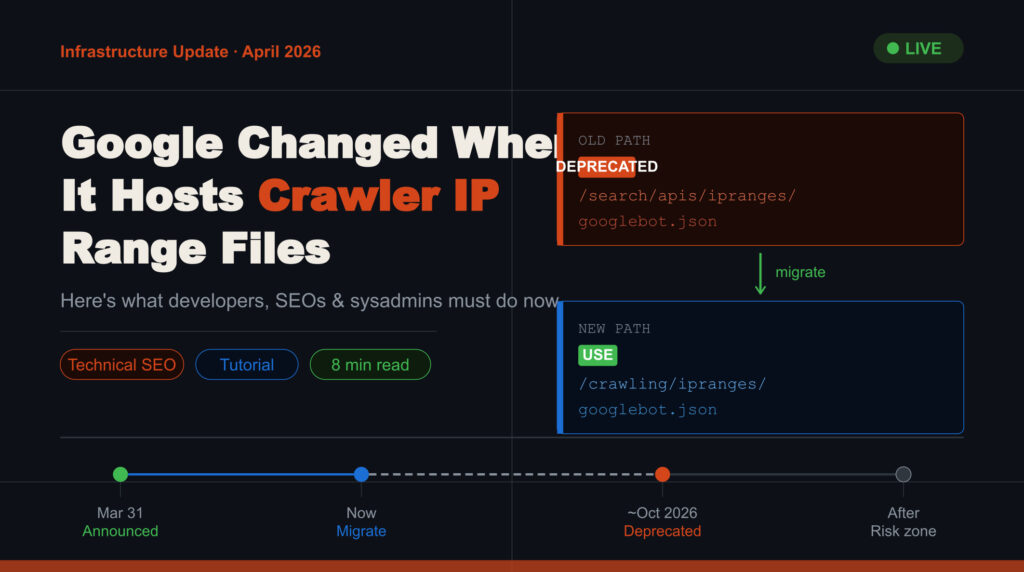
On March 31, 2026, Google officially announced on the Search Central Blog that it had moved its crawler IP range JSON files to a new directory path.
In plain terms, the URLs where your server scripts go to fetch the list of Googlebot IP addresses have changed. The files haven’t disappeared — they’ve just moved home.
This is a purely infrastructural update — it does not change how Googlebot crawls, does not impact rankings, and does not alter crawl frequency or behavior. But failure to update your systems in time will have real operational consequences.
Who needs to read this: Developers, SEOs, and system administrators who manage firewalls, bot validation systems, crawl monitoring tools, or any automated scripts that reference Google’s IP ranges.
What Google Actually Changed
Google officially announced to moved the location of its crawler IP range JSON files from a path associated with Search APIs to a broader, centralized crawling directory.
The reason is straightforward: Google’s crawling infrastructure isn’t exclusive to Search. The same underlying system is used by Google Images, Google News, Feedfetcher, and other services. Hosting these IP files under a “Search APIs” path was technically inaccurate. The new /crawling/ipranges/ directory reflects the true, multi-service nature of the infrastructure.
Old vs. New: Path Reference Guide
Use this as your reference when auditing codebases and configurations.
⚠️ Deprecation Warning: The old paths will be redirected and eventually phased out within approximately 6 months of the March 31, 2026 announcement. During the transition, both URLs work. After deprecation, the old paths will silently return stale or incorrect data.
Why This Matters for Your System
Many production systems silently depend on these IP range files in ways that aren’t always obvious. Here are the systems most likely to be affected:
Firewall rules — Servers that whitelist Googlebot to ensure it isn’t accidentally blocked
Bot verification scripts — Tools that check whether an incoming request is genuinely from Google
Security & WAF configurations — Web Application Firewalls that distinguish real crawlers from scrapers
Log analysis tools — Monitoring dashboards that flag or annotate Googlebot traffic
Automated cron jobs — Scripts that fetch IP ranges daily or weekly to keep lists current
CDN configurations — Content delivery networks with special routing rules for crawlers
Step-by-Step Migration Guide
Step 1: Audit Your Codebase for Old URLs
Search your entire repository for any references to the old path. This includes Python scripts, shell scripts, YAML configs, and infrastructure-as-code files.
bash
# Search for old URLs across your project
grep -r "search/apis/ipranges" . \
  --include="*.py" \
  --include="*.sh" \
  --include="*.yml" \
  --include="*.json" \
  --include="*.conf"
Step 2: Replace All References with the New Path
Once identified, do a find-and-replace across your project files.
bash
# Using sed to replace across all Python files
find . -name "*.py" -exec sed -i \
  's|search/apis/ipranges|crawling/ipranges|g' {} +

# Or use ripgrep for faster scanning
rg -l "search/apis/ipranges" | xargs sed -i \
  's|search/apis/ipranges|crawling/ipranges|g'
Step 3: Update Firewall & WAF Rules
If your firewall fetches the IP list from a URL, update that URL in your firewall management config or control panel. This applies to Nginx, Apache, Cloudflare, AWS WAF, and similar tools.
Step 4: Test in Staging
Deploy the changes to a staging environment and verify that your system successfully fetches data from the new URL and that Googlebot traffic is still being correctly identified in your logs.
Step 5: Deploy to Production
After successful staging tests, roll out to production. Monitor your access logs closely for 48–72 hours after deployment to confirm everything is working correctly.
Step 6: Remove Old Path Fallbacks Before Deprecation
If you’ve added a fallback to the old URL as a safety net, schedule its removal well before the 6-month window closes. Target: before October 2026.
Code Examples
Python — Fetching the Updated IP Range
python
import requests
import json

# ✅ Updated URL — use this going forward
GOOGLEBOT_IP_URL = "https://developers.google.com/crawling/ipranges/googlebot.json"

def fetch_googlebot_ips():
    response = requests.get(GOOGLEBOT_IP_URL, timeout=10)
    response.raise_for_status()
    data = response.json()

    ipv4_ranges = [
        entry["ipv4Prefix"]
        for entry in data.get("prefixes", [])
        if "ipv4Prefix" in entry
    ]
    ipv6_ranges = [
        entry["ipv6Prefix"]
        for entry in data.get("prefixes", [])
        if "ipv6Prefix" in entry
    ]
    return ipv4_ranges, ipv6_ranges

ipv4, ipv6 = fetch_googlebot_ips()
print(f"Fetched {len(ipv4)} IPv4 and {len(ipv6)} IPv6 ranges")
Bash — Cron Job to Auto-Refresh IP List
bash
#!/bin/bash
# Save as /usr/local/bin/refresh_googlebot_ips.sh
# Add to cron: 0 2 * * * /usr/local/bin/refresh_googlebot_ips.sh

NEW_URL="https://developers.google.com/crawling/ipranges/googlebot.json"
OUTPUT_FILE="/etc/nginx/googlebot-ips.conf"

# Fetch and parse IPv4 ranges into Nginx allow directives
curl -s "$NEW_URL" | \
  python3 -c "
import sys, json
data = json.load(sys.stdin)
for p in data.get('prefixes', []):
    if 'ipv4Prefix' in p:
        print(f'allow {p[\"ipv4Prefix\"]};')
" > "$OUTPUT_FILE"

echo "deny all;" >> "$OUTPUT_FILE"
nginx -s reload
echo "✅ Googlebot IP list refreshed at $(date)"
Nginx — Whitelisting Googlebot
nginx
# /etc/nginx/conf.d/googlebot-whitelist.conf

geo $is_googlebot {
    default 0;
    include /etc/nginx/googlebot-ips.conf;  # auto-updated by cron
}

server {
    location / {
        if ($is_googlebot = 0) {
            limit_req zone=general burst=20;
        }
        proxy_pass http://backend;
    }
}
💡 Pro Tip: Never hardcode IP ranges as static lists in your config files. Always fetch them dynamically from Google’s official JSON endpoints and refresh on a schedule — daily is recommended. IP ranges can change as Google expands its infrastructure.
Risks If You Don’t Update
Once the old URLs are deprecated, here is what can go wrong:
1. Googlebot Gets Blocked If your firewall’s IP whitelist goes stale, it will start refusing legitimate Googlebot requests. Your pages stop getting crawled and indexed — directly harming search visibility.
2. Fake Bots Slip Through Systems that verify incoming traffic against Google’s IP list will fail to reject impersonators if the list is outdated. Malicious bots claiming to be Googlebot could bypass your security filters.
3. Silent Script Failures Automated scripts fetching the old URL may not throw an obvious error. They might follow a redirect or return cached data silently, giving you false confidence that your systems are working.
4. Inaccurate Analytics Log analysis tools that segment Googlebot traffic from regular users will misclassify traffic once their IP reference data goes stale, corrupting your reporting.
Migration Timeline
Date
Status
Action
March 31, 2026
Announced
New URLs go live. Both old and new paths active.
Now → ~Sep 2026
Transition Window
Migrate your systems. Both paths still work. Do this now.
~Oct 2026 (est.)
Deprecation
Old URLs phased out. Systems using old URLs may break.
After Deprecation
Risk Zone
Outdated systems fail silently. Crawling and security issues possible.
What This Update Does NOT Change
It’s equally important to know what this update does not affect:
✅ It does not affect rankings
✅ It does not change Googlebot’s crawling behavior
✅ It does not modify crawl frequency or how Google interacts with your site
✅ It is not an SEO penalty or signal of any kind
It is purely an infrastructure and documentation update. The only risk comes from inaction on your side.
Final Migration Checklist
Before signing off, confirm every item below:
Searched all code repositories for old /search/apis/ipranges/ URLs
Replaced all references with the new /crawling/ipranges/ path
Updated any log analysis tools that reference Google IP ranges
Tested the new URL fetches successfully in the staging environment
Confirmed Googlebot traffic appears correctly in server logs post-deployment
Set up an automatic IP refresh schedule (cron job or equivalent) pointing to the new URL
Removed or scheduled removal of any old URL fallbacks before October 2026
Frequently Asked Questions
Why did Google change the location of the crawler IP range files?
The IP ranges are not limited to Google Search — they are used across multiple Google services that share the same crawling infrastructure. The new path reflects this broader usage and provides a more accurate, scalable structure.
Is it mandatory to update immediately?
Not immediately, but Google strongly recommends updating as soon as possible. The old URLs will be phased out within approximately six months. Waiting until close to that deadline increases the risk of avoidable system failures.
What happens if I continue using the old IP range URLs?
Nothing breaks today because Google is maintaining backward compatibility during the transition. However, once the old URLs are deprecated and redirected, systems depending on them may stop working or silently fetch incorrect data.
Does this update affect Google rankings or SEO performance?
No. This is a purely technical infrastructure change. It does not affect rankings, crawling behavior, or any SEO signals. The only indirect risk is if Googlebot ends up accidentally blocked due to an outdated IP list on your end.
How can I verify my system is correctly updated?
Fetch the new URL manually and confirm you receive a valid JSON response. Then monitor your server access logs to confirm Googlebot IPs continue to appear and are being correctly identified.